Showing posts with label 3d models. Show all posts

Tuesday, 29 September 2026

3ds Max AI Asset Management: Search and Organise Your 3D Model Library with Project Manager


Hi Everyone,

I've just created this video going through the new AI features in Project Manager for 3ds Max and, more specifically, how they can be used to search and organise a large 3D model library.

Anyone who has worked with 3ds Max for a long time will probably recognise the problem.

You gradually accumulate hundreds or thousands of 3D models across different projects, drives and asset libraries.

Eventually, finding one particular model becomes less about whether you own it and more about remembering what somebody called the file and where it was saved.

This is where AI-based 3D asset management becomes interesting.

Instead of relying entirely on filenames and manually created folders, Project Manager can use the visual previews associated with your 3D assets to help classify and search them.

Natural Language Search for 3D Models

One of the most useful additions is natural language search.

Rather than searching for an exact filename, you can simply describe what you're trying to find.

For example:

“Futuristic car”

“Dancing woman”

“Glass coffee table”

The system uses visual information from your asset previews to identify relevant 3D models.

That makes the search process much closer to describing what you remember seeing rather than trying to remember how the original 3D file was named.

Natural language searches can also be made in multiple languages, which could be particularly useful for studios with international teams or asset libraries assembled from many different sources.

 
Automatic AI Categorisation of Your 3D Model Library

Project Manager can analyse the visual previews in your library and build category structures for the assets it recognises.

Instead of manually tagging thousands of models, objects can be grouped into categories such as:

• Beds
• Coffee Tables
• TV Stands
• Vehicles
• Aircraft

For a large 3D model library, this can significantly reduce the amount of manual organisation required before the assets become easier to browse and search.

Why 3D Model Thumbnails and Previews Matter

The AI search relies heavily on the visual previews associated with your assets, so good thumbnails are important.

If you already have rendered previews stored alongside your 3D models, images with exactly the same filename as the corresponding 3D file are picked up automatically.

The Auto-Assign Previews tool adds smart matching for cases where the image and model filenames are similar but not identical.

For assets without previews, thumbnails can be batch-rendered directly from your 3ds Max scenes.

This gives the AI useful visual information to work with while also making the library much easier to browse manually.

Find Similar 3D Models

Another useful workflow is Find Similar.

Rather than typing a search phrase, you can select an existing 3D model and ask Project Manager to find other assets with a similar visual appearance.

A similarity threshold allows you to increase or decrease how closely the search results need to match.

This can be particularly useful when you've already found something close to what you need but want to explore alternatives from the rest of your library.

Search for 3D Models Using a Sketch, Reference Image or Mood Board

You aren't limited to assets already inside your library as the starting point for a search.

A reference image can be dragged into Project Manager and used as the basis for a visual search.

That reference could be:

• A photograph
• A render
• A client reference
• A concept image
• A sketch
• A mood board

The AI analyses the visual reference and searches your existing 3D model library for visually or structurally similar assets.

For architectural visualisation in particular, this could be very useful when a client sends over a reference and you want to quickly establish whether something similar already exists in your asset collection.

Local AI Instead of Cloud-Based Asset Search

One of the most significant parts of the system is that the AI processing runs locally on your own hardware.

Your 3D model library doesn't need to be uploaded to a cloud AI service in order to perform classification or visual searches.

For individual artists and studios managing proprietary models, purchased assets or client-specific libraries, keeping the processing local can be an important consideration.

It also means the workflow isn't based around consuming AI credits every time you perform a search.

Watch the Full Project Manager for 3ds Max Walkthrough

In the video below I go through the complete workflow, including:

• Automatic AI categorisation
• Natural language 3D model search
• Multi-language search
• Auto-Assign Previews
• Batch thumbnail rendering
• Find Similar
• Visual similarity filtering
• Sketch and mood-board searching
• Local and offline AI processing


If you're working with a large 3ds Max model library, I'd be interested to know how you're currently managing it.

I really hope you have found this article useful. 

For more info about Project Manager, please check their website:

https://3d-kstudio.com/product/project-manager/


Wednesday, 2 December 2020

3ds Max/V-Ray Apartment Night Christmas Tutorial (with Project files & Videos to download)


Play the Video in Full HD


Hello Everyone😃

2020 has been an extremely challenging year for most of us. Having just entered the festive season, I thought most of us would probably start preparing cards and /or messages to our loved ones, esteemed colleagues and clients.

To help create an imagery to go along with the festive season messages, I have decided to post this 3ds Max scene with V-Ray and Photoshop for users to download and explore.

Alternatively, you can use this 3ds max scene to create something new for your own purposes.
The file comes with the 3ds max scene, shaders, textures, Photoshop files (PSD), Tiff files, JPEGs, Render Elements and much more.

There's also an extensive video depicting the entire process of creating this 3d scene on my blog and YouTube channel.

The Full HD Video tutorial focuses mainly on the process of editing the existing materials, the rendering settings and full post-production using 3Ds Max, VRay and Photoshop. 
Most of the lighting and rendering of this 3d scene were based on my previous day and night courses seen in the Video.  

Please check them both to see how they were put together. Also, the car studio lighting tutorial goes through most VRay settings and materials in detail. 

Alternatively, you can download this full 3d Christmas scene and the Photoshop file to check how everything was put together.

This Full 3Ds max scene with textures and the photoshop file (PSD) is Free for my Patreon supporters, Or $7.00 to Download in the link below if you're NOT.

Patreon page: https://www.patreon.com/user?u=2469908

Alternatively, please visit my Gumroad page to obtain the model. https://gumroad.com/jamiecardoso  

Gumroad Page


Finally, you can also download the entire 3d file for Free Here without the textures included.
 
I really hope you find it useful, like and share it .


You don't need to provide your postal address details, or have a  PayPal account to make a Paypal transaction (Paypal accepts Cards, also). Choose the second option below to pay without a paypal account (Pay by debit or credit card).

The above link will take users to the PayPal page. After the transaction is complete, the user will be automatically redirected to a Google drive, to access and download the project files,Videos, Textures, etc.

Projects files and Resources are available for download.

I hope you find it useful.  

While all my courses and tutorials are in full HD with custom captions and full explanations throughout; this one video tutorial will only have a nice and cosy festive season background music, to truly capture the spirit of this festive season. 

I really hope you find it useful,  like and share it.


Relink Bitmap plug in: https://www.colinsenner.com/scripts/relink-bitmaps

Autoplace:  http://www.scriptspot.com/3ds-max/scripts/autoplace

Pivot & Align Tools : http://www.scriptspot.com/3ds-max/scripts/pivot-align-tools-quad-menus


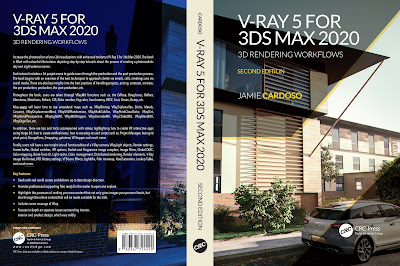
Finally, I have just published a New Book with Taylor & Francis/CRC Press, entitled,  

V-Ray 5 for 3ds Max 2020: 3D Rendering Workflows

 Click on the image below to find out more about my new book.


                                                         Video Captions available (CC)


                                                      Video Captions available (CC)


                                                      Video Captions available (CC)


Checkout below my other Courses with High Resolution Videos, 3d Project files and Textures included.

Course 1: Exterior Daylight with V-Ray + 3ds Max + Photoshop  

Course 2: Exterior Night with V-Ray + 3ds Max + Photoshop


https://blogger.googleusercontent.com/img/b/R29vZ2xl/AVvXsEhuyYCmOT9v7OF9_ZclMoObyO4u5iYBpEPAmcbajHlzlJVy_Xz7NUY4Gf34zCj1Qb8jdzlc7PksVoa3ntryaX3ZRTASbgiTpRzdOFl-Xji8TaCG6eRSHAf8p-vaObm_5y0I2PEqw2GVUuGM/s1600/Living+Room+3dBeeIT+Camera+Raw+Filter.JPG
 Course 3: VRay 3ds Max Interior Rendering Tutorials 

Course 4: Interior Daylight with V-Ray + 3ds Max + Photoshop

Course 5: Interior Night with V-Ray + 3ds Max + Photoshop


Course 6: Studio Lights with V-Ray + 3ds Max + Photoshop

Course 7: 3d People + 3ds Max + VRay + Photoshop 
Course 8: Planning Applications for Verified Views


Also, please Join my Patreon page or Gumroad page to download Courses; Project files; Watch more Videos and receive Technical Support. Finally, check my New channels below:

https://www.patreon.com/user?u=2469908   


Important Terminologies & Descriptions:

3d Rendering: Is the process of converting the three dimensional (3D) data seen in a 3d scene into 2D image/s (rasterized).
The rasterization process include, the rendering parameters, the rendering engine, lights, 3d models, textures, shaders, and other effects. 
3D renders can be a sequence of animated objects/effects/cameras, or a single frame with a still camera and object/s.
The Video depicted here will take you through the process of rendering.

Photorealistic Rendering: Is the Process or Art of making a typical Computer Generated Image/render (CGI) look indistinguishable from a real photo.
To achieve this, users often need to possess the skills and the"eye" to appreciate good photography, cameras, composition, lighting, shaders, materials, 3d modelling, rendering and have some post-production skills. 

Architectural Rendering, or architectural illustration/Visualizations, is the art/process of creating two-dimensional images or animations depicting the attributes of an architectural design, while using state of the art applications such as, Autocad, 3ds max, VRay, Cinema 4d, Blender, Maya, Corona, Photoshop, etc

Post-Production: Is the process of creating effects or/and results after (post) the main process.
This terminology can be used to describe the results (post-production) of main processes such as 3d renderings  and/or filming a scene.
The post-production often occurs in applications such as Photoshop, After Effects, Nuke, etc. 
The Video depicted here will take you through the process.

V-Ray: Is a rendering engine that uses global illumination algorithms, including path tracing, photon mapping, irradiance maps and directly computed global illumination.
Furthermore, it is used as a commercial plug-in for third-party 3D computer graphics software applications such as 3ds max, Maya, Houdini, Blender, Nuke, etc,  for visualizations and computer graphics in industries such as media, entertainment, film and video game production, industrial design, product design and architecture.


Adobe Photoshop:
 Photoshop is a powerful raster based graphics program produced by the Adobe Corporation. 

It is widely used for a variety of photo/image editing purposes worldwide. The program has a huge number of filters, functions, plug-ins, scripts, etc.

In addition, there is a huge online support for this software, and countless online sites with tips and tutorials.

Finally, there are readily available books, online/college courses, and its full documentation at Adobe.com