Sunday, 1 December 2019

Vray Mesh Export Missing from 3ds Max Quad Menu


        Play the Video in Full HD and with Subtitles (CC)

There are times when the VRay menus are Not  available on the right click quad.
This often happens after installing 3ds max and VRay, or during the installation of other programs in 3ds max.

This Video Tutorial takes users through the quick process of enabling back the VRay menus when Unavailable from the right click quad.

To enable the VRay menus, do the following: MAXScript Listener > registervraymenus() > Enter

Note: If using 3ds Max 2018 or earlier, open "New Script" dialog > type in "registervraymenus()" > press "Enter" > Save the script > Run Script
I really hope you find this Tutorial useful.


                                                         Video Captions available (CC)


                                                      Video Captions available (CC)


                                                      Video Captions available (CC)


Video Captions available (CC)


Finally, I have just published a New Book with Taylor & Francis/CRC Press, entitled,  
V-Ray 5 for 3ds Max 2020: 3D Rendering Workflows

Click on the image below to find out more about my new book.


Ta
J


Checkout below my other Courses with High Resolution Videos, 3d Project files and Textures included.

Course 1: Exterior Daylight with V-Ray + 3ds Max + Photoshop  

Course 2: Exterior Night with V-Ray + 3ds Max + Photoshop


https://blogger.googleusercontent.com/img/b/R29vZ2xl/AVvXsEhuyYCmOT9v7OF9_ZclMoObyO4u5iYBpEPAmcbajHlzlJVy_Xz7NUY4Gf34zCj1Qb8jdzlc7PksVoa3ntryaX3ZRTASbgiTpRzdOFl-Xji8TaCG6eRSHAf8p-vaObm_5y0I2PEqw2GVUuGM/s1600/Living+Room+3dBeeIT+Camera+Raw+Filter.JPG
 Course 3: VRay 3ds Max Interior Rendering Tutorials 

Course 4: Interior Daylight with V-Ray + 3ds Max + Photoshop

Course 5: Interior Night with V-Ray + 3ds Max + Photoshop


Course 8: Planning Applications for Verified Views


Also, please Join my Patreon page or Gumroad page to download Courses; Project files; Watch more Videos and receive Technical Support. Finally, check my New channels below:

https://www.patreon.com/user?u=2469908  

Sunday, 14 July 2019

3ds Max and V-Ray Tutorials/Courses Available

Hello Everyone,

Checkout some of my Best vray tutorials for 3ds Max available now.

All online courses and tutorials are in High Definition (HD), with 3d Project files you can download, Materials, Textures, Custom Captions (CC), and much more.

All Tutorials and Courses entitle you to receive a 24/7 Technical Support (for 30 days), if desired. 

My courses can also be found on my :

Patreon page: https://www.patreon.com/user?u=2469908


Gumroad page: https://gumroad.com/jamiecardoso


Udemy page: https://www.udemy.com/user/jamie-cardoso/


                                                         Video Captions available (CC)


                                                      Video Captions available (CC)


                                                      Video Captions available (CC)


Video Captions available (CC)


Finally, I have just published a New Book with Taylor & Francis/CRC Press, entitled,  

V-Ray 5 for 3ds Max 2020: 3D Rendering Workflows
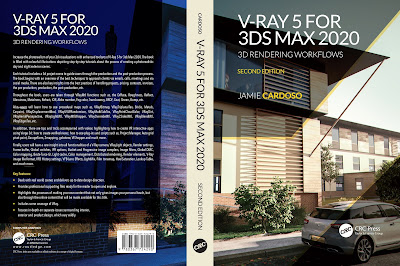
 Click on the image below to find out more about my new book.


I hope you find the video courses listed below useful (the courses below were created using V-Ray 3.6) :

https://blogger.googleusercontent.com/img/b/R29vZ2xl/AVvXsEhuyYCmOT9v7OF9_ZclMoObyO4u5iYBpEPAmcbajHlzlJVy_Xz7NUY4Gf34zCj1Qb8jdzlc7PksVoa3ntryaX3ZRTASbgiTpRzdOFl-Xji8TaCG6eRSHAf8p-vaObm_5y0I2PEqw2GVUuGM/s1600/Living+Room+3dBeeIT+Camera+Raw+Filter.JPG
Course 1: VRay 3ds Max Interior Rendering Tutorials
                           

http://jamiecardoso-mentalray.blogspot.com/2019/12/season-greetings-vray-3ds-max-tutorial.html
  2: Season's Greetings VRay & 3ds Max Tutorial
                         

Course 3: Planning Applications for Verified Views

Course 4: 3d People + 3ds Max + VRay + Photoshop 

Course 5: Exterior Daylight with V-Ray + 3ds Max + Photoshop  


Course 6: Exterior Night with V-Ray + 3ds Max + Photoshop

Course 7: Interior Daylight with V-Ray + 3ds Max + Photoshop

Course 8: Interior Night with V-Ray + 3ds Max + Photoshop


Also, please Join my Patreon page or Gumroad page to download Courses; Project files; Watch more Videos and receive Technical Support. Finally, check my New channels below:

https://www.patreon.com/user?u=2469908